AI Image Product Photos
May 13, 2026 by Dihan Stoltz · 5 min read
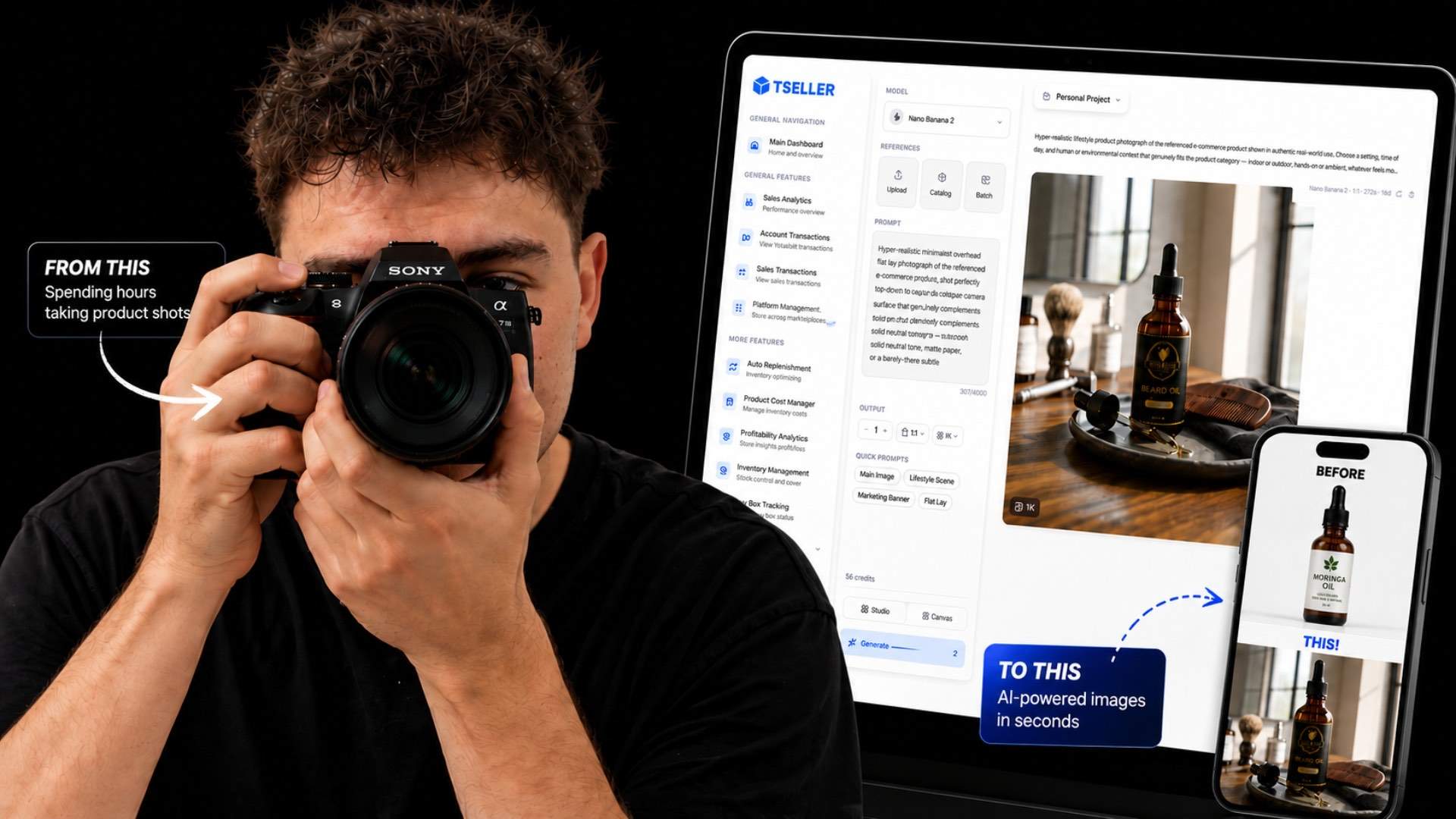
If you sell anything online, your product images are your biggest conversion lever. Better image equals more clicks, more sales — on any platform, every time. Today TSeller is launching AI Image Studio: generate studio-quality product photos, lifestyle scenes, and ad creatives in seconds, straight from your TSeller account. No camera. No photographer. No studio. No excuses. Every TSeller account starts with 60 free AI Image Studio credits — no card needed.
Why Product Images Are Your #1 Conversion Lever
On Takealot, Amazon, Makro, Shopify — every marketplace and every ad platform — the first thing a shopper sees is your image. The image decides whether they tap into your listing or scroll past. Better photography lifts click-through rate, conversion rate, Buy Box position, and ad performance all at the same time. The problem with traditional product photography: a studio shoot costs thousands of rand per SKU, takes weeks to schedule, and never scales to a catalogue of hundreds. AI changes that maths completely.
What TSeller AI Image Studio Does
AI Image Studio is built directly into TSeller. Open the Studio from your dashboard, pull a product from your live Takealot, Amazon, Makro, Shopify, or WooCommerce listings, choose a Quick Prompt or write your own, and generate a studio-quality image in seconds. Refine it, download it, and use it anywhere visuals sell — marketplace listings, product detail pages, paid social ads, Google Shopping. One workflow, every channel.
Catalogue Reference — Pull Directly From Your Live Listings
This is what makes TSeller AI Image Studio different to a standalone AI tool. The Studio reads your live catalogue. Every Takealot, Amazon, Makro, Shopify, and WooCommerce product you have connected to TSeller is searchable inside the Studio. Select a listing, click Generate, and the AI works from your actual product — not a stock photo, not a generic upload. No re-uploading product photos every time you want a new creative.
Quick Prompts — Studio Shots, Lifestyle Scenes, Ad Creatives
Quick Prompts is a one-tap library of the image styles every seller needs most. Pure white background shots for Takealot, Makro, and Amazon listings. Lifestyle scenes with realistic backdrops for Shopify and your own website. Bold ad creatives for Facebook, Instagram, and Google Shopping. Crop and aspect-ratio variations for every platform. Tap a prompt, generate, refine. If you have a specific scene in mind, write your own prompt — the model handles natural-language instructions like "matte black background with soft top-down lighting" or "on a marble kitchen counter with morning sun".
Nano Banana Pro vs Nano Banana 2
AI Image Studio runs on two models so you can pick the right tool for each job.
Both models live inside the same Studio interface. Switch between them per generation depending on whether you need quality or speed.
Editing, Refining, and Downloading
Generated an image but want it slightly different? Hit Refine. Adjust the prompt, swap the background, change the angle, add a prop, zoom in on a specific feature — the AI re-renders without losing the original product. When the image is right, download it in the format you need and use it on your Takealot listing, your Amazon main image, your Shopify product page, or your next Facebook ad. Every image you generate is yours to use anywhere.
Where to Use Your AI-Generated Images
AI Image Studio is platform-agnostic. The images you generate work everywhere you sell or advertise.
If visuals sell on the platform, AI Image Studio outputs work for it.
Pricing — 60 Free Credits Per Account
Every TSeller account starts with 60 free AI Image Studio credits. No card. No commitment. Use them across Nano Banana Pro and Nano Banana 2 to explore the Studio at your own pace. When you need more credits, top-ups are available at fair, transparent ZAR pricing. AI Image Studio sits inside TSeller's flat R199 per month subscription — every other TSeller feature stays included, you only top up if you generate beyond your monthly credit allocation.
Conclusion
Studio-quality product photos used to mean a five-thousand-rand shoot, a week of scheduling, and zero scalability. TSeller AI Image Studio kills all three at once. Open the Studio, pull a product from your live catalogue, generate a hero shot in seconds, use it everywhere visuals sell. Start your free 14-day TSeller trial at https://tseller.co.za and your 60 free AI Image Studio credits are waiting on the other side. No camera, no photographer, no studio, no excuses.