Buy Box Repricer
May 13, 2026 by Dihan Stoltz · 9 min read

Buy Box repricing is the most cost-effective way to grow sales on Takealot. The Buy Box wins the order — credible marketplace studies put Buy Box capture rates at roughly 80% of all completed sales. A Buy Box Repricer is the software that wins that position for you automatically, adjusting your selling price against competing offers every few minutes inside guardrails you set, so you never sell below your real profit floor. TSeller's Buy Box Repricer reprices on Takealot every 6 minutes through the official Takealot Seller API — the fastest cadence available to any Takealot third-party tool. Two new features just shipped: external listing repricing, which lets you reference any seller's price even when they are not on your listing, and a new Buy Box Management Table view with inline editing and a live per-product profit breakdown. This is the complete guide to how it works and how to set it up properly on Takealot today.
What Is a Buy Box Repricer?
A Buy Box Repricer is automated pricing software that monitors competing offers on a marketplace and adjusts your selling price in real time to keep you in the Buy Box position — the prominent buy button that drives the majority of marketplace sales. On Takealot the Buy Box is the Add to Cart button at the top of a product detail page. Winning it is the difference between hundreds of orders a week and almost none. Manual repricing — checking competitor prices and adjusting your own by hand — works for a tiny catalogue, but it stops working the moment you sell more than a handful of products. Competitors reprice constantly throughout the day; by the time you check, adjust, and refresh, you have already missed the window. A Buy Box Repricer like TSeller automates the whole loop: poll competitor prices, evaluate against your rules, push the new price through Takealot's official Seller API, and confirm the Buy Box status — every 6 minutes, around the clock, on every product you choose to track.
How TSeller's Takealot Buy Box Repricer Works
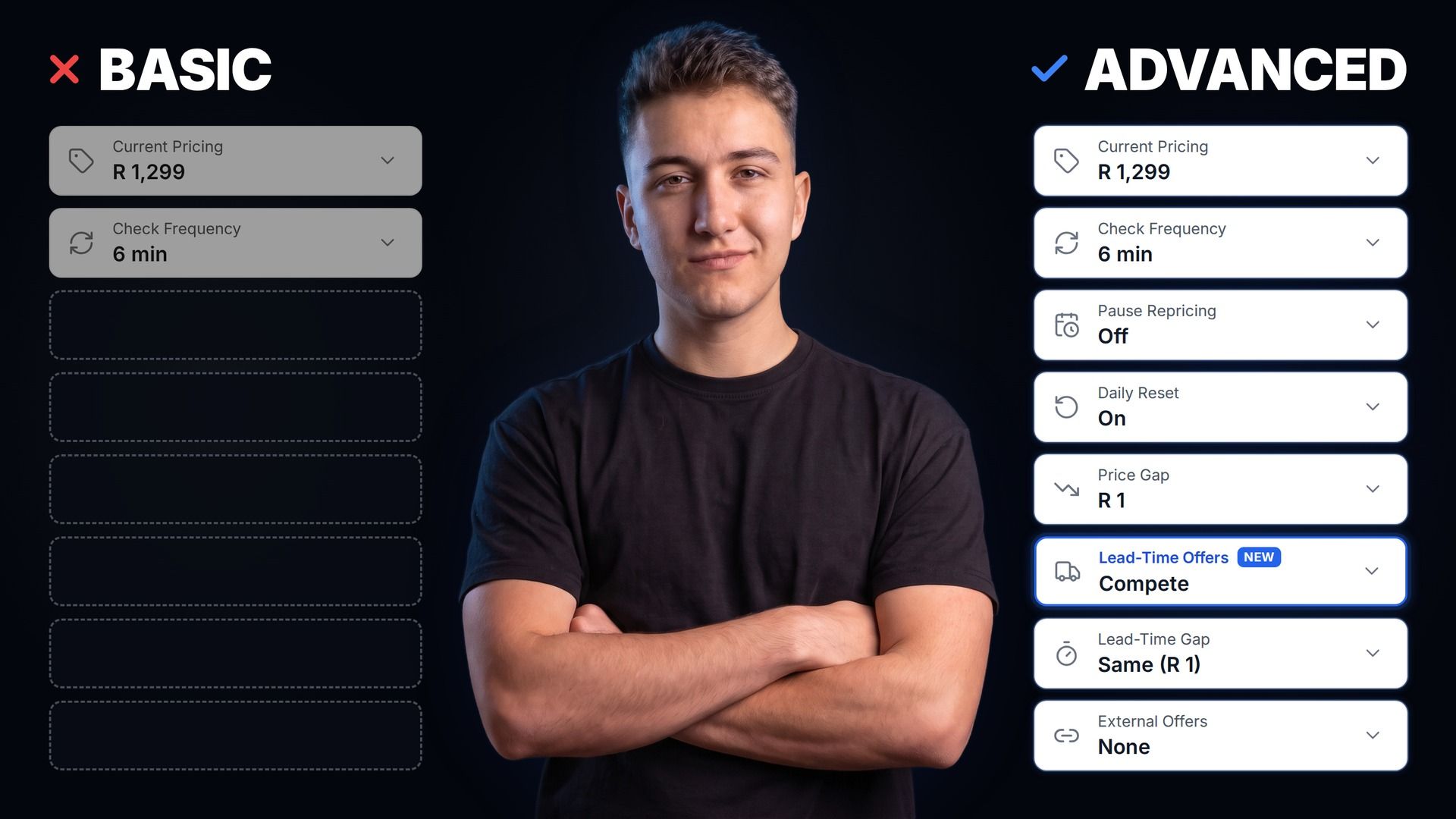
TSeller's Buy Box Repricer runs on the official Takealot Seller API — every reprice happens through the same channel Takealot uses internally, with no scraping and no shared passwords. For each product you enable, you set six configurable values, then TSeller does the rest.
From there, the engine runs continuously. Every 6 minutes it fetches the live prices of every offer on your listing (plus any external reference URLs you have added), compares them against your rules, calculates the optimal price, pushes the update through the Takealot Seller API, and re-checks whether your offer now holds the Buy Box. Every change is logged for review in the analytics view.
Setting Your Floor Price
The single most important setting on any Buy Box Repricer is the floor price — the lowest amount your repricer will ever drop your listing to. If your floor is below your true input cost, every sale at the floor is a loss. The correct floor is your product cost plus the Takealot success fee plus the fulfilment fee plus a packaging allowance plus a returns provision plus a minimum profit margin. Use the TSeller Takealot Profitability Calculator to load your costs and compute the real per-SKU input cost — then set your floor a few rand above it for a margin buffer. Set this once per product and every reprice from that point forward respects it automatically.
NEW: External Listing Repricing
The biggest gap in traditional Buy Box repricing is that the repricer can only react to competitors who are listed on the same product page as you. If a competitor undercuts you on their own separate Takealot listing — same product, different SKU — your repricer never sees them, and you lose the sale anyway. TSeller's new external listing repricing fixes that completely. Paste any Takealot product URL into the Advanced Rules panel for one of your tracked products and the auto-repricer treats that competitor's price as a reference. Even when the competitor is not on your listing, TSeller adjusts your price below theirs automatically, every 6 minutes, within the floor and ceiling guardrails you set. The feature works for single products and product variants. Adding an external competitor takes ten seconds — copy the Takealot URL, paste it into the product's Advanced Rules panel inside TSeller, save. From that moment, the external competitor is treated identically to a same-listing competitor by the repricing engine.
NEW: The Buy Box Management Table
The Buy Box section in TSeller has been rebuilt around a new Management Table view that replaces the old card-based layout. The table view is the right interface for managing a real Takealot catalogue at speed. Every tracked product appears as a row with its current price, minimum price, preferred price, price gap, and daily reset toggle all editable inline. Click a row to expand it and you get a live profit breakdown across all three price points — minimum, preferred, current — calculated using your input cost data from the Product Cost Manager. Filter by Buy Box status. Filter by repricing-enabled. Filter or search by SKU. Sort by any column. The Management Table shows the same data the old card view showed, displayed in a dense, scannable layout that matches how serious sellers actually want to manage repricing — like a spreadsheet, not a stack of cards. The card view is still available; the Management Table is the new default.
Now Live on Makro and Amazon
The Buy Box Repricer now covers Makro Marketplace and Amazon South Africa as well as Takealot, with the same rules — minimum price, preferred price, price gap, monitoring frequency down to six minutes, and daily reset — and one tracking limit shared across all three. See the Makro Buy Box repricer guide and the Amazon Buy Box repricer guide for how each marketplace decides its Buy Box.
Pricing — 10 Free Trackers, R3 Per Extra
TSeller's Buy Box Repricer is built into the flat R199 per month TSeller subscription. Every TSeller account starts with 10 free Buy Box tracking slots — enough to put the repricer through its paces on your highest-priority products. Need to track more than 10 SKUs? Each additional Buy Box tracker is R3 per product per month, added and managed self-service from inside the Buy Box section in TSeller. There is no other variable cost on the repricer. Unlimited reprices per tracker. Unlimited rule changes. Unlimited Excel exports and imports. Every other TSeller feature — Profitability Analytics, Stock Reconciliation, Auto Promotions, Auto Replenishment, AI Image Studio — stays included in the base R199. TSeller is officially listed on the Takealot Seller Success Network.
Conclusion
For any Takealot catalogue beyond a handful of SKUs, a Buy Box Repricer is the single most cost-effective tool a marketplace seller can deploy. TSeller's Buy Box Repricer reprices every 6 minutes, includes the new external listing repricing and Management Table features, and starts at 10 free tracking slots inside the R199 monthly subscription. Start your free 14-day TSeller trial at https://tseller.co.za — no card required.